
Verification
Verification is how XBTFX confirms that the person using an account is the person who opened it. It happens in two levels: identity first, then proof of address. Your level sets your daily withdrawal limits, and some withdrawal methods are not available until you reach the level they ask for.
The checks themselves run through Sumsub, an identity verification provider. Part way through you will leave the XBTFX styling behind and see a screen that says “Powered by Sumsub”. That is expected, not a phishing page. Use the Back link at the top to return to the portal.
Where to find it
- Sign in at portal.xbtfx.com.
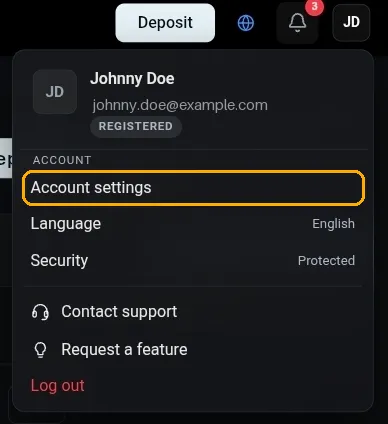
- Select your initials in the top right corner.
- Select Account settings, then Verification in the left sidebar.
The page shows your progress across three stages: Registered, then Identity, then Full verification. Registration is marked complete as soon as your account exists, so a new account starts on the second stage with nothing submitted. The badge under your name in the account menu shows the same level in short form.
Before you start
Have the document itself in front of you, not a copy of it. Scans, photocopies and screenshots of a document are usually rejected, because the check looks for security features that only survive on the original.
You will also need a camera. If you are on a desktop without a webcam, start the flow on your phone instead; it is the same account and the same page.
A few things that cause most retries:
- An expired document. Check the date before you photograph it.
- Glare. Take the document out of any plastic sleeve and move away from a direct light.
- A cut corner. All four corners of the document have to be inside the frame.
Level 1: identity verification
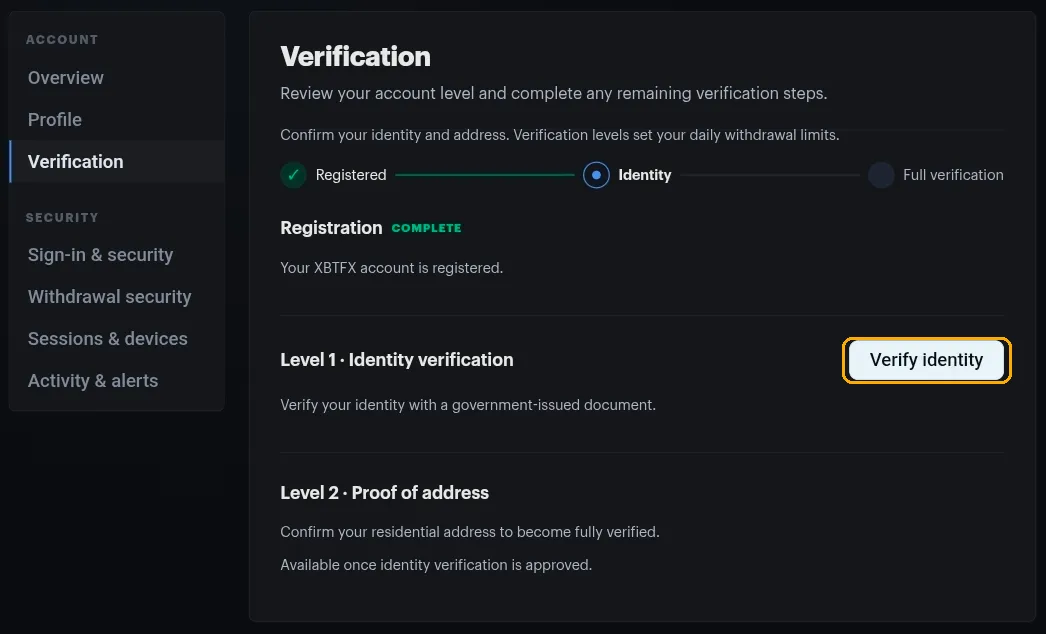
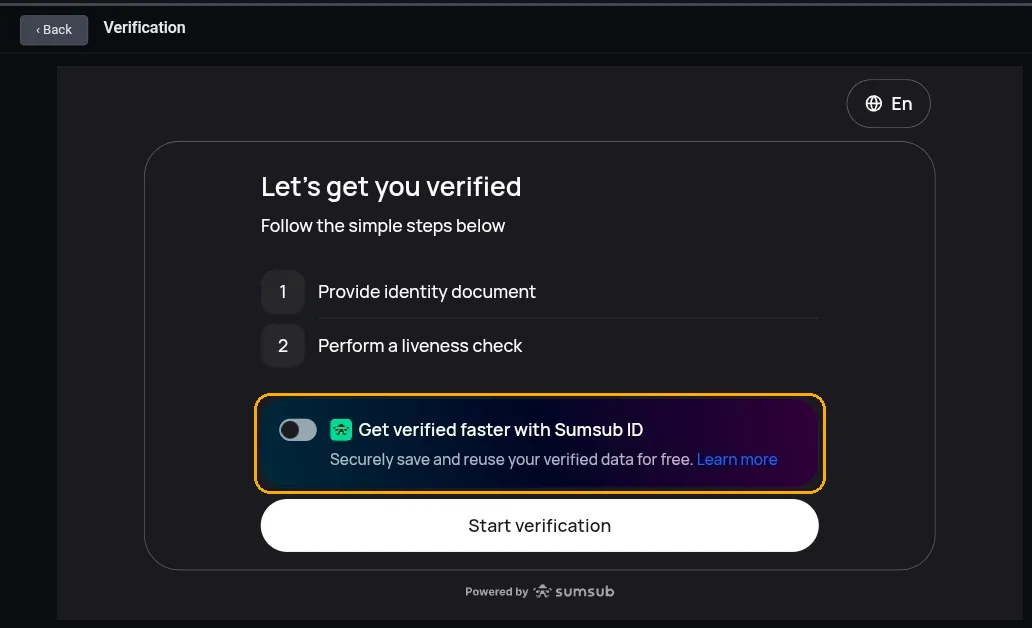
Select Verify identity on the Verification page. The flow opens on a summary of what is coming: provide an identity document, then perform a liveness check. There is a language picker in the top right if English is not what you want.
You will also see a toggle for Sumsub ID, switched off by default. Turning it on saves your verified data with Sumsub so you can reuse it at other services that verify through them. It is optional and it makes no difference to your XBTFX check. Leave it off if you would rather not store the data.
Select Start verification when you are ready.
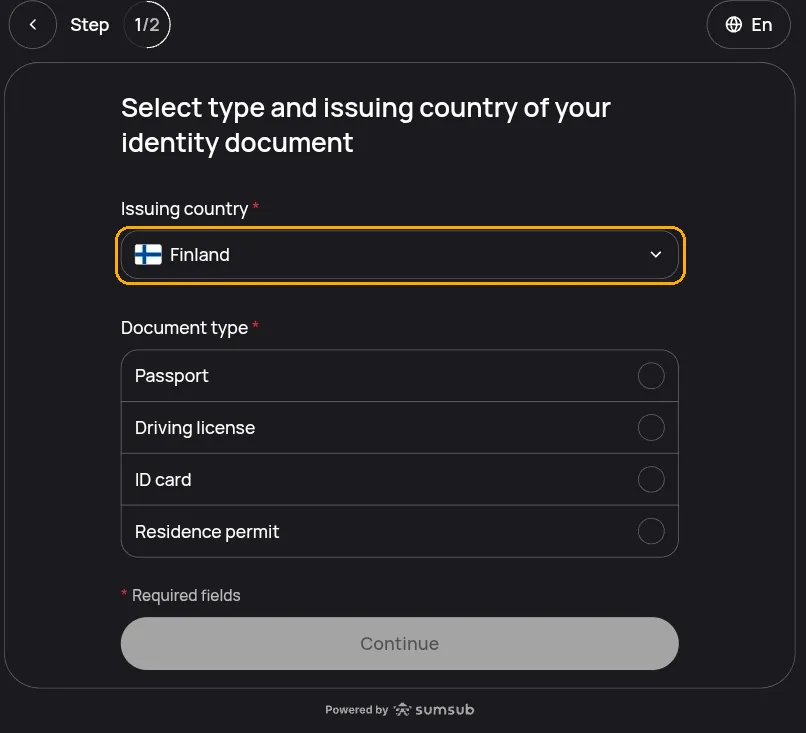
Step 1 of 2: your document
First you choose the issuing country and the document type. Issuing country means the country that issued the document, which is not necessarily where you live now. A French passport is a French passport wherever you are sitting.
The document types offered depend on that country. A typical list is passport, driving license, ID card and residence permit, but not every country offers all four. Continue stays greyed out until you have picked a type.
Then you provide the photos. A passport needs the photo page. A card style document, such as an ID card or a driving license, needs both sides. You can upload a file or photograph the document with your device camera.
Step 2 of 2: the liveness check
The second step is a short face scan. You centre your face in the circle on screen and move your head slowly around it until the ring completes. It takes a few seconds, and it exists to confirm that the person holding the document is really there, which a still photo cannot show.
Take off anything covering your face: hat, sunglasses, a mask. Face a window or a lamp rather than having one behind you.
After you submit
The Verification page moves to a pending state while the check is reviewed. Most checks are decided quickly and automatically. Some are routed to a human reviewer, and those take longer. There is nothing to do in the meantime, and resubmitting will not speed it up.
If the check fails, the page tells you which part to redo and lets you try again. Blurred text, glare, a corner outside the frame and an expired document account for most failures, and all four are fixable on a second attempt.
Your name has to match
The name on your document must match the name on your XBTFX profile. A married name, a shortened first name or a different transliteration of the same name will fail the check. Fix the profile under Account settings > Profile before you submit, or contact support if the field cannot be edited.
Level 2: proof of address
Proof of address confirms where you actually live, and it is what takes an account to fully verified.
It only opens once identity verification is approved. Until then the Level 2 card sits on the page as a preview and there is nothing to select.
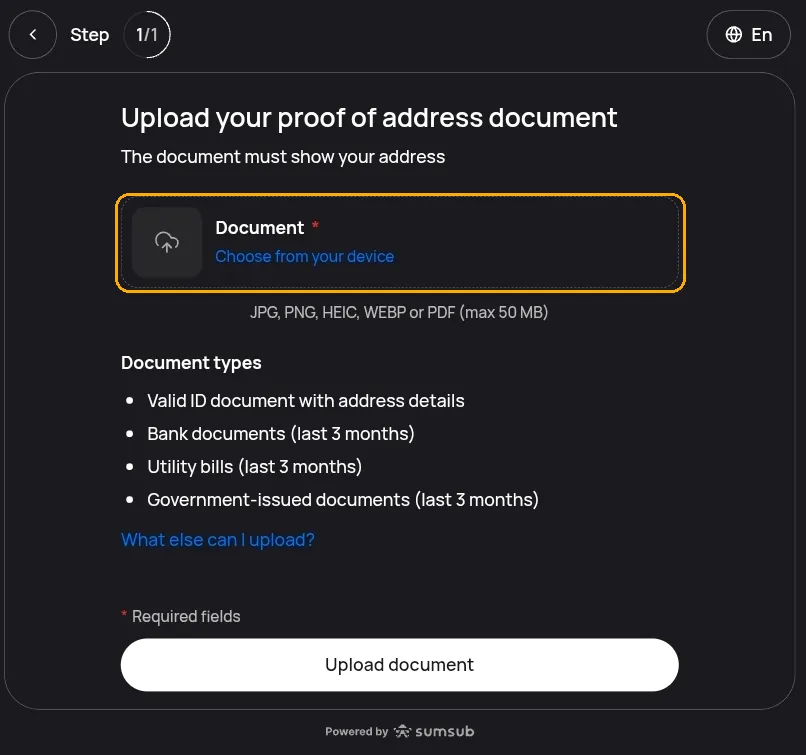
This level is one step and there is no face scan. You upload a single document that shows your address, in JPG, PNG, HEIC, WEBP or PDF, up to 50 MB. Both your name and your address have to be legible on it, and the name has to be the one on your account.
What counts
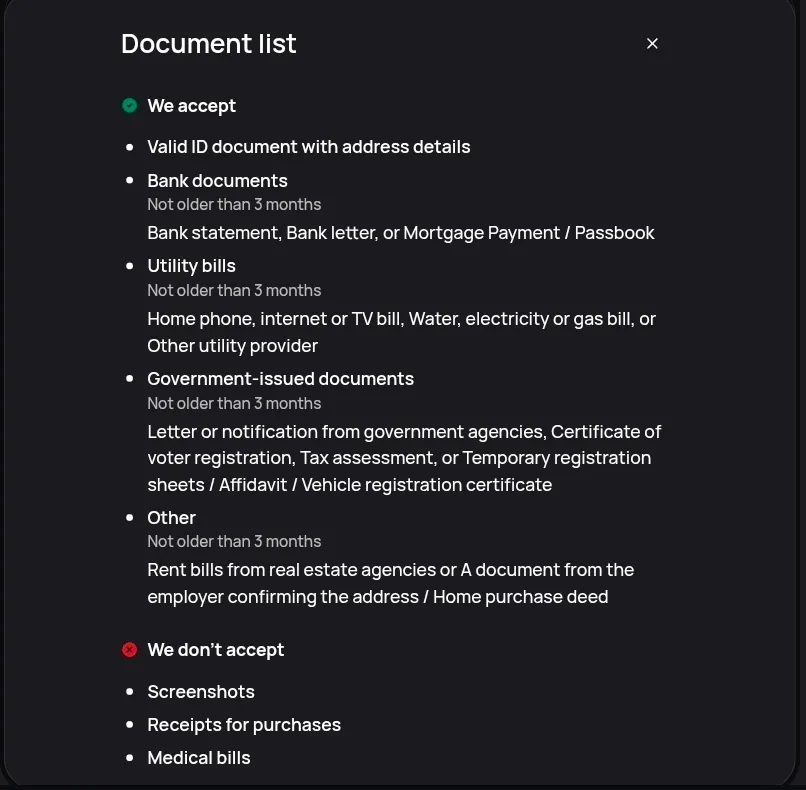
Everything except an identity document has to be dated within the last three months.
| Type | What that covers |
|---|---|
| Valid ID document with address details | An in-date identity document that carries your address |
| Bank documents | Bank statement, bank letter, mortgage payment book or passbook |
| Utility bills | Home phone, internet or TV, water, electricity, gas, or another utility provider |
| Government-issued documents | A letter or notification from a government agency, certificate of voter registration, tax assessment, temporary registration sheet, affidavit, vehicle registration certificate |
| Other | A rent bill from a real estate agency, a letter from your employer confirming your address, a home purchase deed |
The upload screen lists the first four. What else can I upload? opens the full list, including the last row and the rejects below.
What does not count
- Screenshots. This is the one that catches people out. A screenshot of your online banking is not a bank statement. Download the statement as a PDF instead, or photograph a paper one.
- Receipts for purchases.
- Medical bills.
A mobile phone bill is not on the accepted list either. The utility row says home phone.
What verification unlocks
Verification levels set your daily withdrawal limits, so the practical effect of moving up a level is being able to take more out per day.
Individual withdrawal methods also carry their own requirement. On the Withdraw page, each method card shows the verification level your account needs before you can use it. Bank transfer is the one clients hit most often. See Withdrawals for how the page works.
Deposits are a separate question from withdrawals, and so is opening a trading account. See How to Register for what a new account can do straight away.
If you get stuck
Open the chat widget in the corner. Support can see the reviewer’s reason for a rejection, which the portal only summarises, and they can tell you whether a document that keeps failing is one worth retrying at all.