
Deposit by Bank Transfer
You send the money from your bank, upload the confirmation in the portal, and we credit your EUR wallet once the two are matched. It is the only funding method with a manual step on our side.
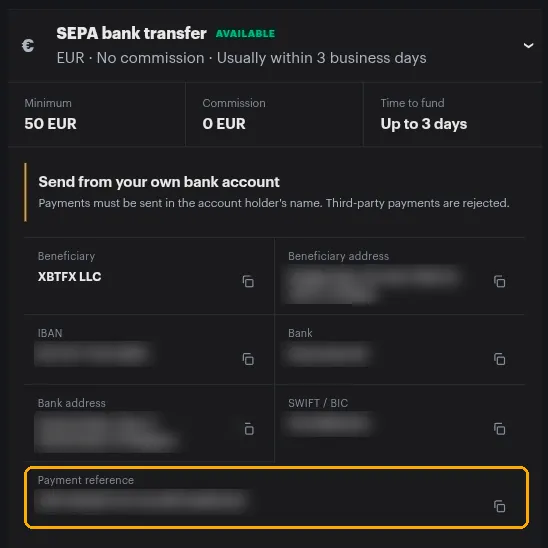
| Minimum | 50 EUR |
| Commission | 0 EUR |
| Time to fund | Up to 3 business days |
Send from your own bank account
Payments must be in the account holder’s name. Money sent from a spouse’s, a company’s or a friend’s account is rejected.
The steps
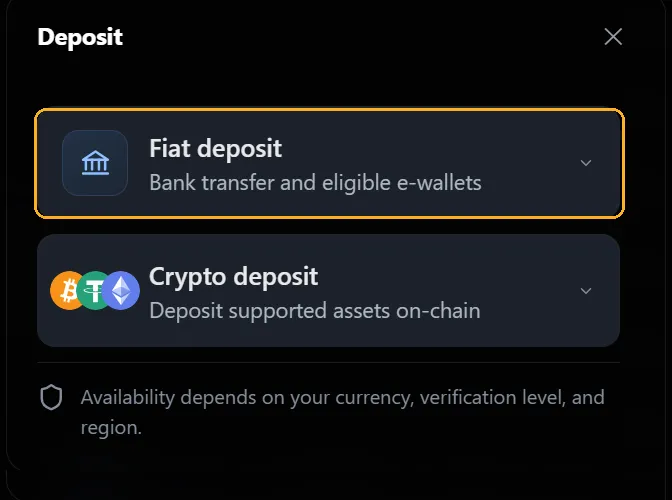
- Sign in to the XBTFX Portal and open Wallet.
- Select Deposit, then Fiat deposit.
- Set Deposit currency to EUR and select SEPA bank transfer.
- Copy the bank details and the payment reference from the panel.
- Send the transfer from your bank, reference included.
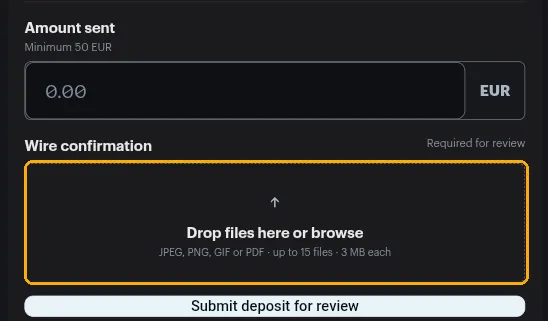
- Come back and enter what you sent under Amount sent.
- Upload your bank’s confirmation under Wire confirmation.
- Select Submit deposit for review.
The bank details
The panel gives you each field with a copy button beside it:
- Beneficiary and beneficiary address
- IBAN
- Bank and bank address
- SWIFT / BIC
- Payment reference
Copy them from the panel rather than typing them or reusing details you saved last time. Banking details change, and a transfer sent to an old one is miserable to chase.
The payment reference is not optional
- It is what identifies the transfer as yours.
- Paste it exactly as shown, with nothing added around it.
- Without it, the transfer has to be traced by hand before anyone can credit it.
- It usually stays the same between deposits, but compare it against the panel each time in case it has changed.
Confirming the transfer
Sending the money starts nothing on its own. This is the step people miss.
- Amount sent has to match the transfer. Minimum 50 EUR.
- Wire confirmation accepts JPEG, PNG, GIF and PDF, up to 15 files at 3 MB each.
- A receipt or statement showing the sender name, amount, date and reference gets through review fastest. A screenshot of your banking app is usually enough if all four are legible.
What happens next
- You send the EUR with the exact reference.
- You upload the confirmation and the amount.
- Our operations team matches it and credits your EUR wallet.
Allow up to 3 business days. Track it under Deposits on the Wallet page, then use Transfer to move it to a trading account.
If it hasn’t been credited
- Check your bank’s record. Transfers sit pending at the sending bank more often than you would think, sometimes a full day.
- Check the reference on the payment against the panel, character for character.
- Check the sending account is in your own name.
- Check you actually submitted the deposit for review with the confirmation attached.
Past 3 business days with all four in order, open the chat widget with the date, the amount, the sending bank and the reference.