
Transfers
Deposits land in a wallet. Trading happens on a trading account. A transfer connects the two, and it runs both ways.
The steps
- On the Wallet tab, select Transfer.
- Pick the source under Send from.
- Pick the destination under To.
- Enter the amount, or select MAX.
- Tick the confirmation line, then select Transfer.
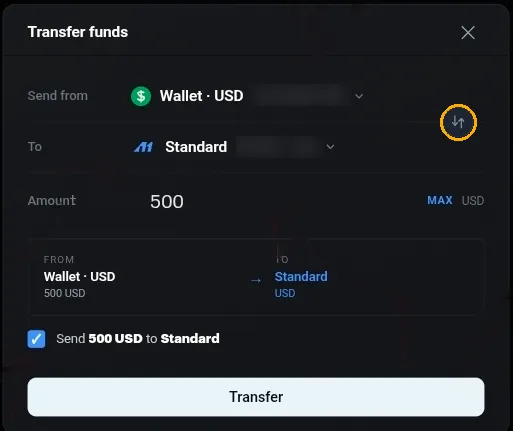
Choosing the two ends
- Both dropdowns hold your wallets and your trading accounts together, each showing its balance.
- Going the other way is the same form. Wallet to account funds trading, account to wallet takes money off the table.
- The button between the two rows, with the two arrows, swaps them. Use it instead of re-picking both.
The amount
- MAX fills in everything available from the source.
- On a trading account with open positions, MAX is less than the account balance. Margin backing a position cannot be moved.
Before you confirm
A summary strip shows the source, the destination and the amount. Under it, a tick box repeats it as a sentence, for example Send 500 USD to Standard.
Read the sentence rather than the dropdowns. The two look alike, and a transfer sent the wrong way is annoying to unpick.
Both balances update on the Wallet page once it goes through.
Worth knowing
- Transferring out of a trading account does not close anything. Positions stay open and your margin level moves, so take the balance down carefully if you are still in the market.
- Money sitting in a wallet is not trading capital. A deposit is only half the job until you have transferred it across.
If a transfer does not appear on either side, open the chat widget with the amount, the direction and roughly when you sent it.